
A fault occurs, production stops, and the technician needs quickly usable information. In many companies, however, a cumbersome process begins at this point: Someone looks for a PC, logs into SAP, opens a form, and tries to describe the error under time pressure and ongoing production. Often, the result is only a report like “Machine broken” or “Pump defective.”
This is not enough for maintenance. Information about the affected equipment, the error pattern, already conducted inspections, urgency, or safety risks is missing. The result is follow-up questions, unnecessary paths, and longer resolution times.
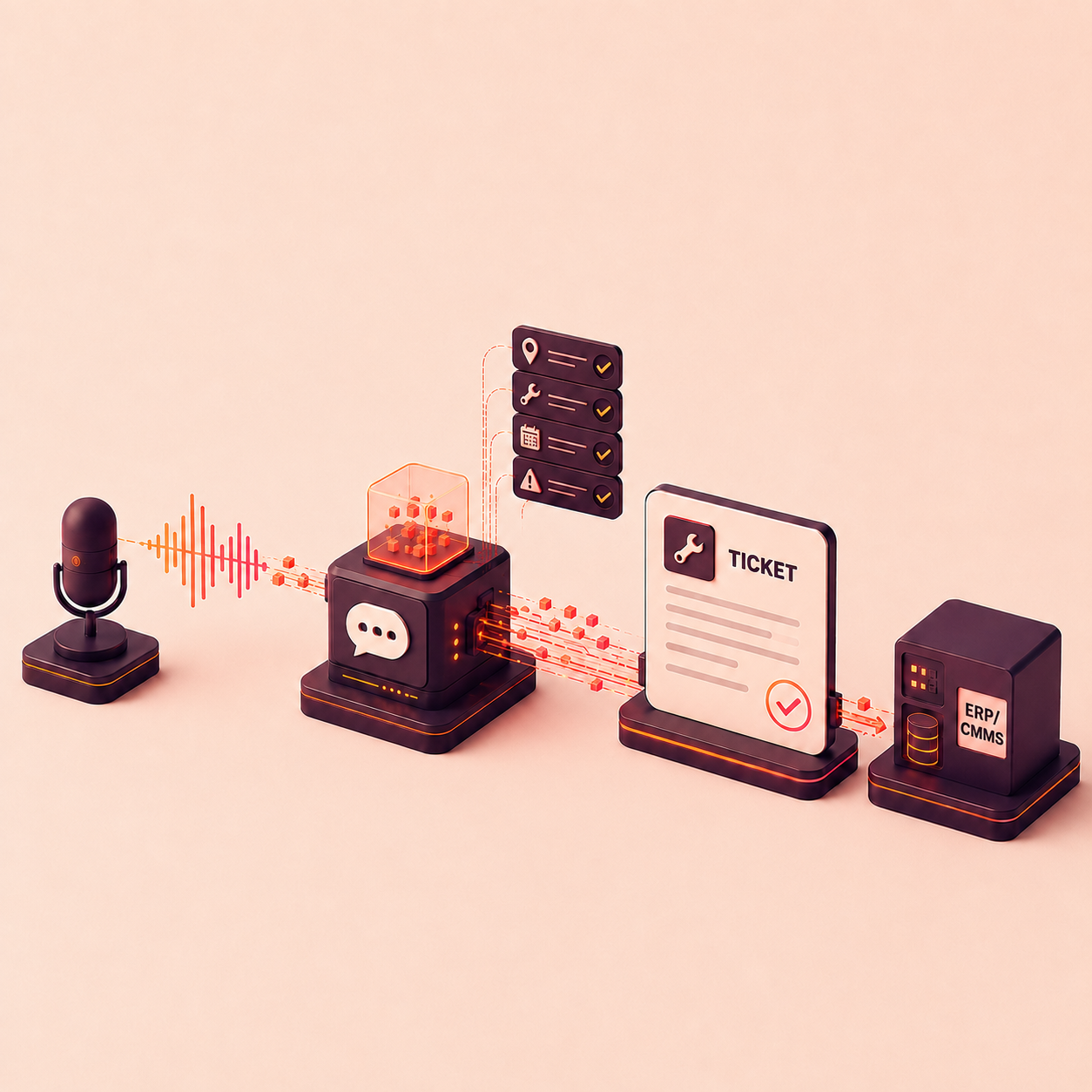
Voice-based fault reports address this issue. Employees describe the situation where it occurs. A digital assistant guides through the report, specifically asks for missing information, and transfers the result in a structured manner to SAP PM or another maintenance system.
This guide shows how industrial companies can practically introduce such a voice-to-ticket process – from hardware selection through system integration to employee training.
Voice-Based Means More Than Dictation
A pure voice input does not solve the problem of incomplete fault reports. It merely replaces the keyboard with a microphone. If “Machine broken” is only transcribed text, the quality of information remains unchanged.
An effective reporting assistant therefore takes on three tasks:
- Capture: It converts the spoken description into text.
- Structure: It assigns content to the required fields and categories.
- Ensure Quality: It identifies missing information and asks targeted follow-up questions.
The goal is not a longer report, but a report that maintenance can work with immediately.
Step 1: Start with a Clear Process
The introduction should not begin with the selection of an AI solution, but with the question:
Where do we lose time or quality in the fault report today?
The existing process from the occurrence of the fault to the completed maintenance report is recorded. Relevant aspects include:
- Who detects and reports the fault?
- How is it currently recorded?
- What information is regularly missing?
- Who needs to ask follow-up questions?
- In which system is the report stored?
- Which fields are technically or organizationally mandatory?
- What differences exist between shifts, plants, and equipment types?
A clearly defined use case is suitable for the start, such as fault reports by production employees on a selected line. A limited process can be tested more quickly and provides reliable insights for the later rollout.
Suitable Starting Metrics
Before starting, a few measurable metrics should be collected:
- average time to create a report,
- percentage of incomplete reports,
- number of necessary follow-up questions,
- time until acceptance by maintenance,
- percentage of reports with correctly assigned equipment,
- use of the intended reporting path.
Without baseline values, it is difficult to assess later whether the voice-based solution actually creates added value.
Step 2: Define What a Good Fault Report Must Contain
Before a voice dialogue is developed, the target image must be clear. What information does a maintenance technician need to assess the situation and initiate the next steps?
Typical components of a qualified fault report are:
- plant, area, or line,
- technical location or equipment,
- affected component,
- observed error pattern,
- time and frequency,
- impact on production or quality,
- urgency,
- possible safety or environmental risks,
- already conducted inspections,
- photos, videos, or documents,
- reporting person and shift.
Not every report requires every field. The dialogue should dynamically orient itself to the context. For example, if a leakage is reported, questions about the medium, discharge amount, and safety risk are more important than for a defective sensor.
Do Not Underestimate Master Data Quality
A voice assistant can only reliably assign if equipment, technical locations, report types, and damage codes are sensibly maintained. Before the pilot project, it should be checked:
- Are the relevant equipment clearly named?
- Are there multiple names for the same equipment?
- Do employees use nicknames or local terms?
- Are catalogs and priorities clearly structured?
- What data must be provided from SAP or other systems?
Local terms should not simply be prohibited. It is better to store them as synonyms and map them to the correct master data.
Step 3: Select Suitable Hardware for the Deployment Location
The best software fails if the input devices do not fit the work environment. In production, different criteria count than in the office.
| Deployment Situation | Possible Hardware | Important Criteria |
|---|---|---|
| Employees already carry mobile devices | Industrial smartphone or tablet | Protection class, glove operation, camera, battery life |
| Noisy environment | Headset or external microphone | Noise cancellation, push-to-talk, wearing comfort |
| Stationary reporting point | Permanently installed tablet or terminal | easy login, robust mounting, good accessibility |
| Work with both hands | Headset or portable device | Voice activation, safe operation, occupational safety |
| Areas with special protection requirements | approved special hardware | Ex protection, hygiene, operational approvals |
Always Test Hardware at the Real Workplace
A microphone that works well in the meeting room can be unusable next to a press or compressor. Tests should therefore take place during actual operation.
To be tested are:
- Recognition quality with typical background noise,
- Comprehensibility with dialects and different languages,
- Operation with gloves,
- Stability of WLAN or mobile reception,
- Safe use during work,
- Cleaning and shared use,
- Device management and updates,
- Behavior during short-term network interruptions.
Often, no new special hardware is required. If suitable smartphones, tablets, or Microsoft Teams workplaces are already available, they can simplify the start. The decisive factor is not the most modern device, but robust and accepted use in everyday life.
Step 4: Design the Voice Dialogue Like a Good Colleague
A good reporting assistant does not behave like a form being read aloud. It allows the person to first freely describe what happened, evaluates the information, and only asks where information is missing.
A possible sequence:
“Water has been leaking from the right flange connection of the cooling water pump P-204 for about ten minutes. The pump is still running, but the leakage is increasing. We have shut off the area.”
The assistant can already recognize from this:
- Equipment: P-204,
- Error pattern: Leakage,
- Location: right flange connection,
- Start: about ten minutes ago,
- Condition: System running,
- Trend: Leakage increasing,
- Measure: Area shut off.
Instead of asking all standard questions, the assistant could only add:
- “Is the leaking medium exclusively cooling water?”
- “Is there an immediate danger to people or neighboring systems?”
- “Should the report be created with high priority?”
- “Would you like to add a photo?”
Design Rules for Understandable Dialogues
- short and clear follow-up questions,
- preferably one question per dialogue step,
- use technical terms of the workforce,
- summarize recognized information before sending,
- allow easy corrections,
- do not guess in case of uncertainty, but ask,
- prioritize safety questions clearly,
- allow abort and manual transfer.
The assistant should support employees, not test or lecture them.
Step 5: Keep SAP PM as the Leading System
A voice-based solution should generally not build a new parallel ticket system. SAP PM or SAP EAM remains the leading system for reports, orders, technical objects, and histories.
The voice assistant takes over user-friendly capture and quality assurance before transfer.
A typical data flow looks like this:
Voice input
→ Transcription
→ Recognition of equipment, error pattern, and context
→ targeted follow-up questions
→ structured report data
→ technical validation
→ transfer to SAP PM/EAM
→ feedback of the SAP report number
For integration, the following points, among others, must be clarified:
- Which SAP version and interfaces are available?
- Which report types should be supported?
- How are technical locations and equipment synchronized?
- Which fields are mandatory?
- How are priorities, catalogs, and damage codes mapped?
- Can images and other attachments be transferred?
- How does the user receive the created report number?
- What happens if SAP is temporarily unavailable?
- How are errors and duplicate reports handled?
The integration should be API-based and traceable. Depending on the system landscape, REST, OData, SOAP, or existing integration services may be used. The exact technical design depends on the SAP architecture and company guidelines.
The Decisive Principle
The assistant does not replace SAP PM. It improves the quality and accessibility of the process before the data is stored in the leading system.
This way, the existing maintenance architecture is retained, while employees receive a significantly simpler interface.
Step 6: Clarify Security, Data Protection, and Co-Determination Early
Voice processing involves operational data and may contain personal information. Therefore, IT security, data protection, and employee representation should not be involved only shortly before the rollout.
The following should be clarified in particular:
- Is the original audio file stored or deleted after transcription?
- Where does the transcription take place – on the device, in the company’s data center, or in a cloud?
- In which region are data processed?
- Which roles are allowed to view, correct, or approve reports?
- How is the login done?
- Are existing identity providers used?
- What protocol and audit data are generated?
- How long are contents stored?
- How are sensitive production information protected?
- What operational agreements are necessary?
For many industrial companies, EU hosting, private cloud, or on-premises options are important selection criteria. Equally important is transparent communication: The solution serves better documentation and support – not performance or behavior control of individual employees.
Step 7: Start with a Limited Pilot Project
A pilot should be large enough to reflect real conditions but small enough to quickly adapt dialogues and processes.
A meaningful pilot includes, for example:
- a clearly defined production area,
- selected types of faults,
- a manageable user group from production and maintenance,
- real SAP master data,
- defined success metrics,
- a direct feedback channel,
- regular short evaluation and adjustment meetings.
It is important not only to test technically simple reports. The pilot should also consider unclear situations, dialects, background noise, missing master data, and interruptions.
First Shadow Mode, Then Productive Transfer
Initially, the assistant can generate reports without automatically saving them in SAP. The structured output is compared with the previous report and checked by a responsible person.
Only when assignment, mandatory fields, and dialogue logic work reliably, is the direct transfer activated. This approach reduces risks and builds trust with IT and the department.
Step 8: Train Employees Practically
The training should not be set up as a classic software introduction. It is crucial that employees understand when and how to speak a good fault report.
An effective introduction includes:
- short exercises directly at the workplace,
- typical examples from their own plant,
- deliberately incomplete reports to test follow-up questions,
- tips for clear, natural language,
- exercises to correct recognized information,
- explanation of what happens with the data,
- fixed contacts for the start phase.
Involve Multipliers from the Shop Floor
Experienced employees should already be involved in designing the dialogues. They know local terms, typical error patterns, and actual workflows. As multipliers, they can later answer questions and increase acceptance in the team.
The introduction works better when it is perceived as a joint improvement project – not as an IT system imposed from above.
Step 9: Measure Impact and Roll Out Gradually
After the pilot, not only usage numbers should be considered. A high number of generated reports does not yet say anything about their quality.
Relevant metrics are:
- average capture time,
- completeness of the reports,
- percentage of correctly assigned equipment,
- number of follow-up questions by maintenance,
- percentage of subsequently corrected reports,
- usage by shift or area,
- time until qualified processing,
- quality of error and damage codes,
- acceptance by reporting and processing employees.
Only after a stable pilot phase should the process be transferred to other lines, plants, or use cases. Local differences must be taken into account. A central basic logic is sensible, but dialogues and master data often require site-specific adjustments.
Common Mistakes in Introduction
1. Viewing Language Only as a Replacement for the Keyboard
Without follow-up questions and structuring, the same incomplete reports as before are created – only spoken.
2. Asking Too Many Questions
A dialogue that queries every possible field quickly becomes as unpopular as a long form. The assistant should use known information and only fill relevant gaps.
3. Ignoring Poor Master Data
Unclear equipment names and duplicate technical objects cannot be solved by AI alone. The introduction often makes such problems visible for the first time.
4. Involving Maintenance Too Late
Production and maintenance must jointly define which information is really needed.
5. Rolling Out the Entire Plant Immediately
Without a pilot, too many simultaneous sources of error arise. A limited use case allows for quick improvements.
6. Treating Data Protection and Works Council as a Final Task
Late involvement can unnecessarily delay or stop a technically functioning project.
7. Building a Parallel Reporting System
If data later has to be manually transferred to SAP, an additional process is created instead of a simplification.
Practical Example: Hahn PRO ADAM as Voice-to-Ticket Assistant
Hahn PRO ADAM was developed as an intelligent reporting assistant for industrial maintenance processes. Employees can describe a fault by voice. ADAM structures the information, checks the report for completeness, and asks targeted follow-up questions if information is missing.
Technically, ADAM is not positioned as a replacement for SAP PM or another CMMS. The platform acts as a process-oriented operation and quality layer before the leading system. Through interfaces, the structured data can be transferred to SAP PM/EAM and stored there as a maintenance report. The specific field assignment, report type, and integration logic are aligned with the existing system landscape.
A typical process with ADAM:
- A production employee opens ADAM, for example, via a mobile device or an integrated communication channel.
- He describes the fault in natural language.
- ADAM recognizes technical objects, symptoms, impacts, and already conducted measures.
- Missing information is supplemented in the dialogue.
- The user checks a short summary.
- ADAM transfers the structured report to SAP PM/EAM.
- The generated report number is returned.
Together with Axalta Coating Systems, ADAM was tested as an AI-supported reporting assistant in practice. The starting point was incomplete reports and a high effort for follow-up questions. In the beta phase, improved reporting quality and noticeable time savings were reported. The joint project reached the finals of the Maintenance Award 2025.
The key benefit lies not only in voice recognition. It arises from the combination of guided dialogue, context knowledge, quality assurance, and integration into existing processes.
Checklist for Project Start
Before a pilot project, the following questions should be answered:
- Which specific reporting process will be improved first?
- Which user groups are involved?
- What must a complete report contain?
- Which master data is needed from SAP?
- Which hardware is suitable at the workplace?
- How loud is the real environment?
- Which interfaces are available?
- What authentication is used?
- How are audio data and transcripts handled?
- Which metrics represent the baseline?
- Who checks the results during the pilot?
- How are employees and employee representation involved?
- What criteria are used to decide on the rollout?
Conclusion: Qualify the Process First, Then Automate
Voice-based fault reports can significantly lower the hurdle for documentation. The real added value, however, only arises when a free description becomes a complete, structured, and directly usable maintenance report.
For this, process, master data, dialogue design, hardware, security, integration, and change management must be considered together. Simply placing a microphone in front of an existing input form digitizes the old effort. Redesigning the reporting process, on the other hand, creates better data for faster decisions and a reliable maintenance history.
Hahn PRO ADAM combines simple voice input with guided quality assurance and transfer to existing systems like SAP PM/EAM. This creates no additional data channel, but a direct path from observation on the shop floor to qualified reporting in the leading system.